Platform · 2025
Audit Tracker
An audit-engagement tracker built for a Kuala Lumpur chartered accountancy firm. It follows every engagement from client setup through pre-audit planning, field work, review, partner sign-off, and post-audit follow-up, replacing a stack of Excel files for 30+ staff.
- client companies
- 195
- active audits
- 354
- user roles
- 4
- Role
- Tech lead, team of one or two
- Built at
- Amphibia Digital
- Client
- Chartered accountancy firm, Kuala Lumpur
- Users
- 30+ audit staff
- Stack
- Next.js
- React
- Convex
- TypeScript
- Tailwind CSS
- Docker
Overview
An audit firm runs every engagement through a long sequence of dependent steps: plan it, do the field work, clear the review points, get sign-off, chase post-audit items and bank confirmations, and log everyone's time against it. The firm held all of that in spreadsheets and shared folders. That works until a partner asks what is outstanding across the whole firm right now.
Audit Tracker answers that question live. It runs on a reactive Convex backend, so when a team member ticks off a field-audit section, the team leader's progress bar and the partner's dashboard update without a refresh. Four roles see four different products: partners get firm-wide reporting, team leaders run engagements end to end, team members work only their assigned files, and system admins own users, rates, and the master section catalogue.
Related:Tax Console
What I built
- Full engagement lifecycle: company master records, pre-audit planning with budgeted time cost, field audit by section and subsection, review points, sign-off, and archive.
- Field audit driven by a configurable master section catalogue, with per-engagement progress and remarks.
- Review points raised and resolved inline; sign-off locks the engagement and keeps an archived, read-only record.
- Bank confirmations and post-audit pending items with follow-up tracking.
- Timesheets and time-log uploads against engagements, with an hourly-rate history per staff level.
- Partner reporting: financial summary, fees by portfolio group, fees vs cost year on year, engagement performance, and a custom report builder with CSV/Excel export.
- Role-based access for partner, team leader, team member, and system admin, plus a full activity log.
Screens
33 captioned views. Select any to enlarge.
Partner: firm-wide view
6 views
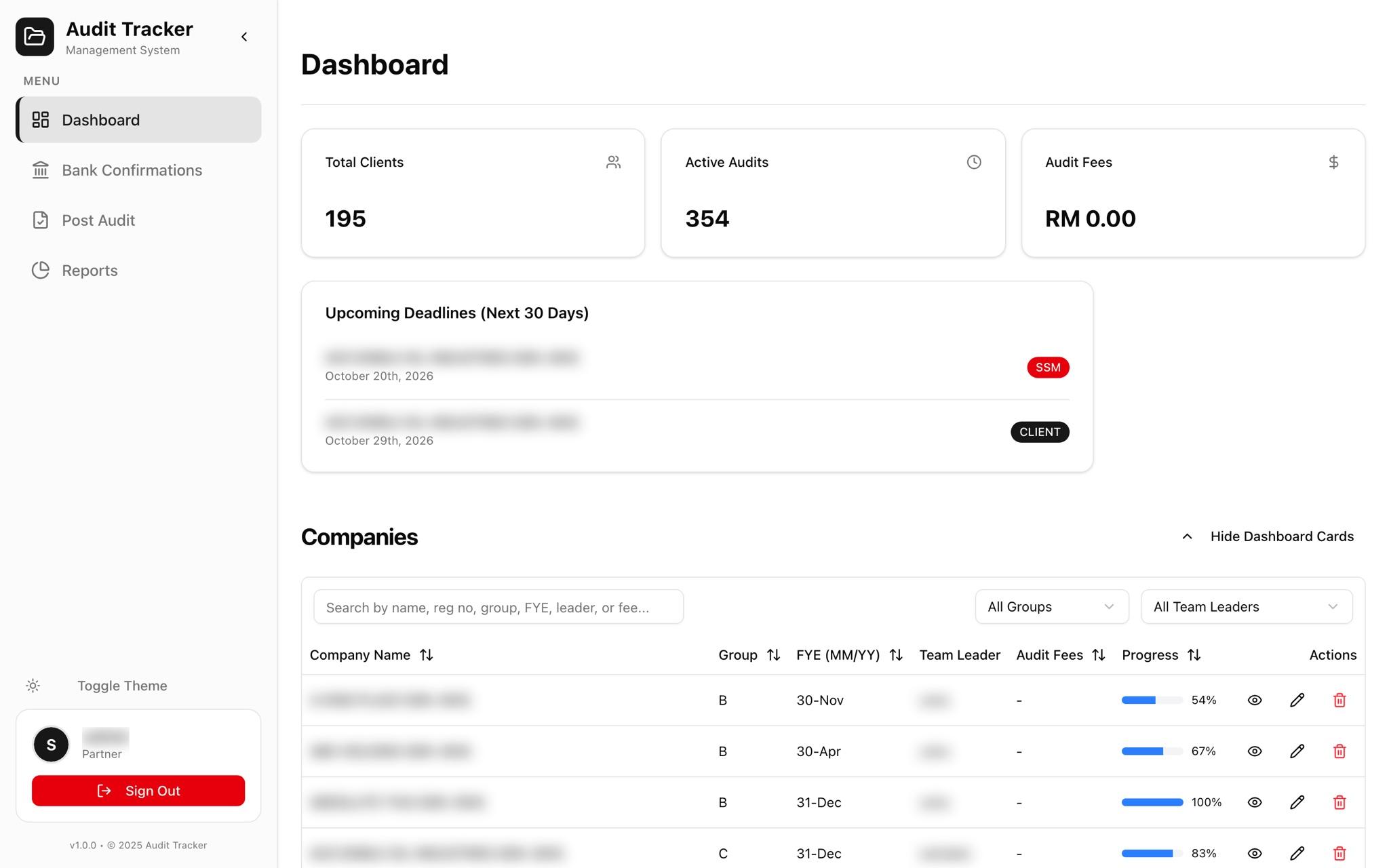
01Partner dashboard
Firm-wide totals, upcoming SSM and client deadlines, and every company's progress by group and team leader.
02Reports: financial summary
Audit fees, time cost, net margin, and average fee per engagement, filterable by year end and portfolio group.
03Reports: charts
Audit pipeline by status, fees by portfolio group, fees against time cost year on year, and top engagements by fee.
04Reports: engagement performance
Every engagement's status, opinion, fee, cost, and margin in one table.
05Custom report generator
Filter by client, team leader, status, opinion, industry, partner, and fee range, then pick the columns.
06Custom report preview
Live preview of the chosen columns across all matching engagements, exportable to CSV or Excel.
Team leader: running an engagement
18 views
07Company master record
Registration, year end, portfolio group, client PIC, and addresses. Every engagement hangs off this record.
08Team & audit history
Tax agent, company secretary, appointment and engagement letter dates, the engagement team, and every past audit.
09Engagement overview
Partner, employee count, opinion, reporting dates, and audit fee against time cost for the year.
10Engagement financials
Revenue, profit after tax, total assets, equity, and share capital captured per engagement.
11Deadlines & team
Internal, SSM, client, and IRB deadlines with status, and the audit team with their roles.
12Time logs
TimeCost billing exports uploaded per engagement and matched to staff time.
13Pre-audit
Bank confirmation, management accounts, and documentation milestones before field work starts.
14Financial planning & timeline
Budgeted time cost, proposed and final fees, live cumulative time cost, and the expected completion date.
15Field audit progress
Completion across the master sections and their subsections, section by section.
16Manage sections
Tailor the section catalogue for a single engagement without touching the firm-wide master.
17Review points
Points raised during review, tracked until resolved.
18Sign-off
Sign-off is only available once every review point is resolved.
19Signed off
Who signed, and when.
20Engagement activity
Every change to the engagement in an append-only activity trail.
21Archived engagement
Closed engagements stay readable but locked.
22Bank confirmations
Confirmation requests per engagement, with follow-up tracking.
23Post-audit items
Open items after sign-off, chased to closure.
24Dark mode
Every screen has a dark theme.
Team member: assigned work only
3 views
25Team member dashboard
Only the engagements this person is assigned to.
26Field audit section
Subsection checklist with status per item.
27Remarks
Notes against a field-audit item for the reviewer.
System admin
6 views
28Sign-in
Staff sign-in.
29User management
Accounts and roles across partners, team leaders, team members, and admins.
30Hourly rates history
Charge-out rates by staff level, with history kept for past engagements.
31Timesheets
Firm-wide timesheets, compiled from the time logs.
32Activity logs
Every mutation across the system, filterable by module.
33Master sections
The firm-wide field-audit catalogue of sections and subsections.
Open to senior / lead roles · remote or relocating to Singapore
Hiring for a senior or lead role?
I take systems from requirements to production: mobile, web, backend, and AI agents. Tell me about the problem and I will reply within a day on weekdays.