Mobile app · 2026
Resilify
Resilify is a recovery companion for people quitting a compulsive habit. A ten-question onboarding produces a dependency score and a personal plan; from there the app tracks clean days, runs daily check-ins, and keeps a panic button, breathing exercises, and the user's own reasons one tap away. Built with Expo and Convex, in review on the App Store and Google Play.
- onboarding questions
- 10
- stores from one codebase
- 2
- Role
- Solo developer, design to store submission
- Type
- Independent product
- Platforms
- iOS and Android
- Status
- In App Store and Google Play review
- Stack
- Expo
- React Native
- TypeScript
- Convex
- RevenueCat
Overview
Resilify starts with an assessment. Ten questions cover age, how long the behaviour has been going on, frequency, impact, previous attempts, motivation, support system, primary trigger, goal, and preferred tone. The answers become a dependency score, a plan of concrete weekly actions, and a commitment the user signs on screen before the paywall.
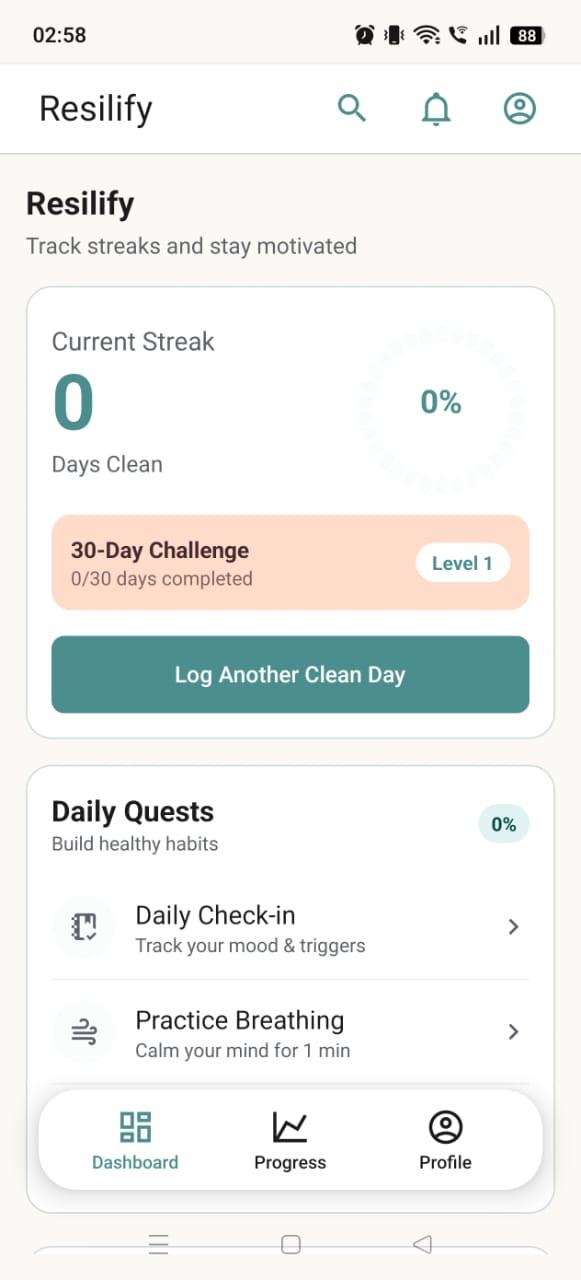
The daily loop is small on purpose: log a clean day, do a check-in (mood, triggers, journal, gratitude), and watch the 30-day challenge and level move. When an urge hits, the panic screen asks what triggered it, shows the reasons the user wrote down, and leads into a guided breathing session. A relapse-risk score is computed from recent check-ins, and a recovery timeline shows what changes in the body at 24 hours, 3 days, a week, and beyond.
The backend is Convex: habits, check-ins, progress, achievements, community posts, and partner invites are reactive queries, so the dashboard updates the moment a check-in is saved. Sign-in is email and password with bcrypt hashes, with the session token kept in the device's secure store. Subscriptions run through RevenueCat on both platforms.
Related:TileHabit
What I built
- Ten-step onboarding that scores dependency and generates a personal plan and a signed commitment.
- Clean-day streak, daily check-ins with mood, triggers, journal, and gratitude, and XP that feeds levels and a 30-day challenge.
- Panic button: capture the trigger and feeling, surface the user's own reasons, then a guided Relax or Focus breathing session. Screenshots are blocked on that screen.
- Relapse-risk score from recent check-ins, a 12-week activity heatmap, time reclaimed, and a body-recovery timeline.
- Learn library with articles and quizzes across science, techniques, strategies, and stories; nine achievements from First 24 Hours to 90 Days Resilience.
- Community with anonymous posting, upvotes, comments, and a report flow that sends posts to a moderation queue; accountability partners invited by email; crisis lines one tap away.
- Morning and evening reminders plus milestone alerts through Expo notifications; RevenueCat subscriptions on iOS and Android.
Screens
14 captioned views. Select any to enlarge.
Dashboard & progress
6 views
01Dashboard
Current streak ring, the 30-day challenge, and the day's quests: a check-in, a breathing session, one article.
02Quick actions
Check-in, Panic, Community, Learn, and Progress one tap from the top, with the next health milestones underneath.
03Commitment and time reclaimed
The dependency score, goal, trigger, and tone from onboarding stay on the dashboard, beside minutes reclaimed and achievements.
04Progress
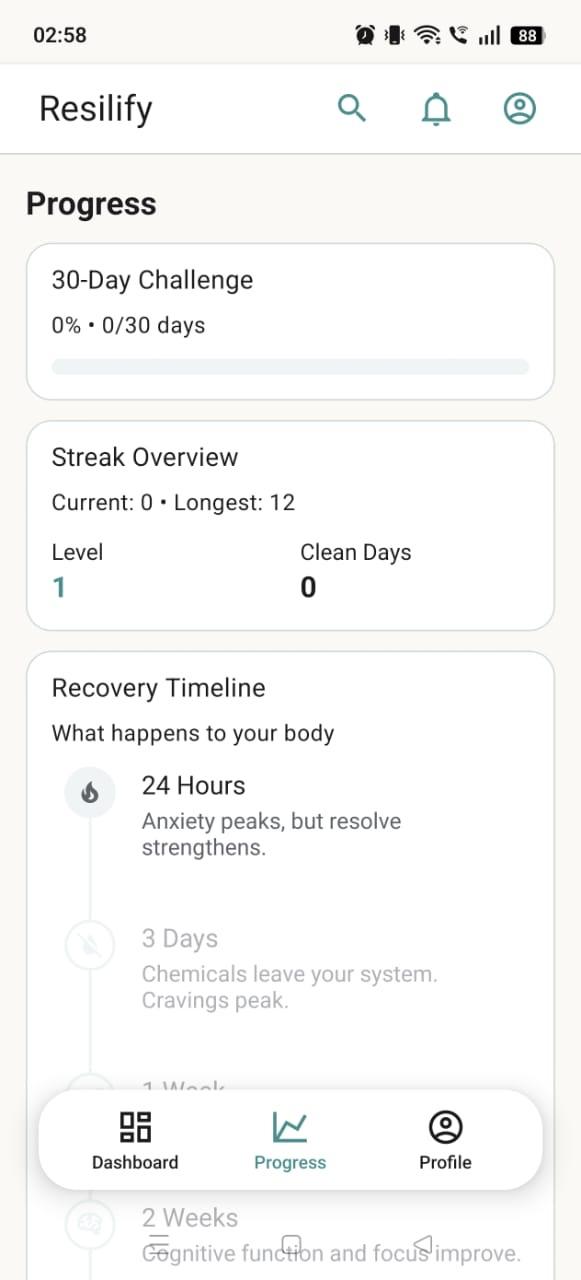
30-day challenge, streak overview, and a recovery timeline of what changes at 24 hours, 3 days, a week, and a month.
05Relapse risk
A risk score from recent check-ins, the most common triggers, and a 12-week heatmap.
06Profile
Stats, the signed commitment, and preferences for the leaderboard and direct messages.
Panic, breathing & support
4 views
07Breathing: Focus
Box breathing for concentration and stress. The panic screen leads here once the trigger is logged.
08Breathing: Relax
The slower mode, for sleep and anxiety.
09My reasons
Motivations the user writes down. The panic screen shows them back at the moment they are needed.
10Partners and emergency resources
Accountability partners by email, crisis lines, and a danger zone that resets the streak or deletes the account.
Onboarding
4 views
11Step 1: age range
Ten questions feed the dependency score.
12Step 2: how long
How long the behaviour has been going on.
13Step 4: impact
Impact on daily life, 1 to 10.
14Step 10: communication style
Direct, encouraging, or detailed: the tone the app uses from then on.
Open to senior / lead roles · remote or relocating to Singapore
Hiring for a senior or lead role?
I take systems from requirements to production: mobile, web, backend, and AI agents. Tell me about the problem and I will reply within a day on weekdays.